SIMMERDIAL / Guides
How to set and adjust a dial kitchen timer on iPhone
To start a kitchen timer in Simmerdial, turn the dial clockwise and release. The timer starts immediately, with the selected duration snapping to 15-second increments. You can adjust the remaining time while it runs or add five minutes with a tap. The maximum duration is 60 minutes.
Step by step
- Choose the duration from your recipe or food packaging. For example, if the instructions call for 10 minutes, turn the dial to 10.
- Release the dial to start. On first use, allow system alerts if you want a reminder while the iPhone is locked or the app is closed.
- Read the remaining time in the center. The orange ring gives a visual indication of how much time remains.
- Turn clockwise to increase the remaining time or counterclockwise to reduce it. Tap Add 5 min for a five-minute extension.
- Use Reset to clear the timer. When time is up, use Stop to dismiss the alert.
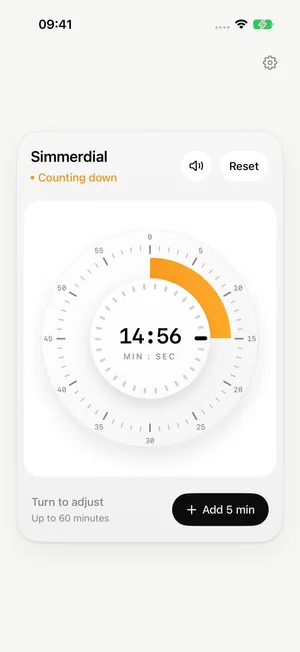
An example: timing a cooking step
If your recipe calls for a 10-minute step, turn the dial to 10 and release. Suppose the countdown later shows two minutes and you want five more: tap Add 5 min to make the remaining time seven minutes. For a smaller change, turn the dial and watch the number in the center. Follow your recipe for cooking times and doneness checks.
What does the orange ring show?
The ring shows the remaining duration on a 60-minute dial. A 30-minute countdown fills half the ring; a 15-minute countdown fills a quarter. Read the number in the center for minutes and seconds. The ring gets smaller as time passes and grows when you add time.
Can I time several dishes at once?
Simmerdial manages one countdown at a time. It suits a single cooking step you want to watch and adjust. If you need separate timers for several dishes, use an app with multiple timers, such as the iPhone’s built-in Clock app.
What are the limits?
Simmerdial adjusts in 15-second increments, up to 60 minutes. It requires iOS 26 or later. Setting a timer and receiving system alerts work offline; system alerts still require permission and successful scheduling.
Try the dial before downloading
The homepage has an interactive preview of the dial. It demonstrates setting and adjusting time in the browser. For system alerts while your iPhone is locked, use the iOS app.
Keep reading
iPhone Clock or Simmerdial: which kitchen timer should you use?
Download on the App Store
US$0.99 on the US App Store. Prices in other regions may vary.
For iPhone · iOS 26 or later